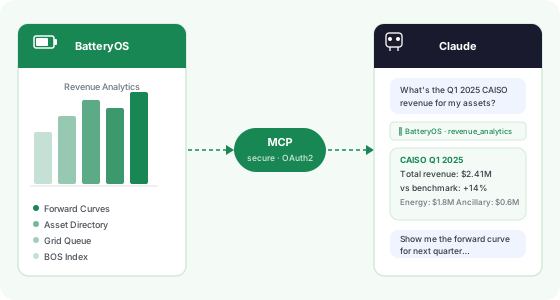
BatteryOS in your AI workflow
Pull market data, revenue analytics, and asset research directly into Claude, Cursor, or any MCP-compatible AI tool. No tab switching, no exports.
- Market analytics & forward curves across all ISOs
- Revenue benchmarks & BOS Index data
- BESS asset directory & interconnection queue
- Forward curves calibrated to traded markets
- ISO-wide price data & heatmaps
- Historical & forecast prices
- Asset revenue performance
- BOS Index benchmarking
- Scenario & dispatch analytics
- BESS asset directory
- Interconnection queue data
- Operating status tracking
Authenticate via OAuth2 using your existing BatteryOS credentials. No separate password.
One command or a settings toggle. Choose your platform in the setup section below.
Query your energy data in natural language inside Claude, Cursor, or Windsurf.
Individual users (Pro / Max)
- Go to Settings → Integrations
- Click Add integration
- Paste the server URL and click Connect
- Authenticate with your BatteryOS credentials
Teams & Enterprise admins
- Go to Organization Settings → Connectors
- Click Add Custom Web server
- Paste the server URL and save
- Members then go to Settings → Connectors, find BatteryOS, and click Connect to authenticate
Server URL
https://mcp.batteryos.com/sse
Steps
- Open
claude_desktop_config.json - Add the BatteryOS server block shown here
- Restart Claude Desktop and BatteryOS tools will appear
{
  "mcpServers": {
    "BatteryOS": {
      "command": "npx",
      "args": [
        "-y",
        "mcp-remote@latest",
        "https://mcp.batteryos.com/sse"
      ]
    }
  }
}
Steps
- Run the command in your terminal
- Authenticate when prompted (OAuth2)
- Access tools via
/mcpin any Claude Code session
# Add the BatteryOS MCP server
claude mcp add batteryos \
  --transport http \
  https://mcp.batteryos.com/sse
Cursor, Windsurf, and other MCP clients
Add a new MCP server in your client’s settings using the server URL below. Refer to your client’s documentation for where to add custom MCP servers.
Server URL
https://mcp.batteryos.com/sse
Ready to connect BatteryOS to your AI tool?
Existing subscribers: connect in under 2 minutes. No new account needed.
Get Setup Instructions